“Hosting Order Cart With Slider” Documentation by “Coding Portfolio” v1.0
“Hosting Order Cart With Slider”
Created: 10/06/2017
By: Coding Portfolio
Url: codingportfolio.com
Email: support@codingportfolio.com
Thank you for purchasing our script. If you have any questions that are beyond the scope of this help file, please feel free to email us. Thanks so much!
Table of Contents
- Configuration
- CSS Files and Structure
- JavaScript
- Sources and Credits
- Any additional unique features that need an overview
A) Configuration - top
You can configure your slider in js/config.js file.
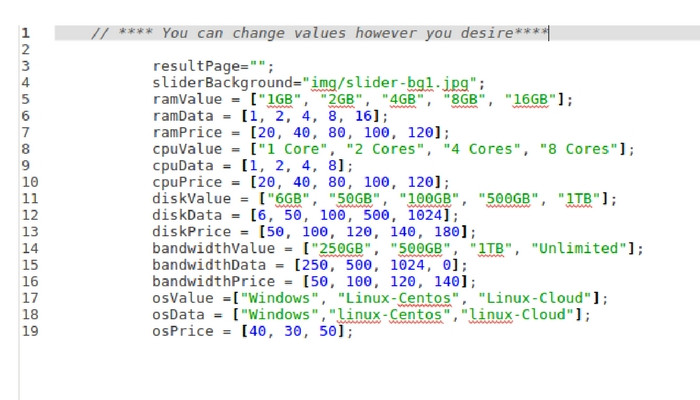
Using Configuration Variables:
resultpage: You can write url address of page which you want your slider to redirect after pressing order button.
Slider will send results of order to this address so you can easily get with $_REQUEST or $_GET these variables.
resultPage="order-page.php";
sliderBackground: You can write address of any image that you want as your slider's background.
Example Usage:
sliderBackground="images/background.jpg";
Other Variables: There are 3 types of variables as you can see in above code section of config.js which are value, data and price.
These Variables;
ramValue: set labels of Ram slider, you can set label names in quotes.ramData: values that will be sent to result page
ramPrice: price of each product which also will be added to Total Price
All other variables with value, data and price has same logic with Ram variables
B) CSS Files and Structure - top
There is only 1 css file for slider design in css folder.
In css file there are comments at the beginning of each code section
If you would like to edit a specific section of the site, simply find the appropriate label in the CSS file, and then scroll down until you find the appropriate style that needs to be edited.
Other third party css files are located in 3rdParty folder, it is adviced not to modify these files for slider to function properly.
For to change background of slider you don't need to edit css file, you can do this in js/config.js file as mentioned before.
C) JavaScript - top
This script has two main javascript files under js folder.
- config.js
- order-slider.js
- config.js is the javascript file for configuration of your slider, you can configure your slider in this file.
- order-slider.js file is the main javascript file for your slider, it is recommended not to modify this file for your slider to function properly.
Other javascript files are 3rdParty files, it is not adviced to modify those files for your slider function properly
D) Sources and Credits - top
3rd Party sources used are
- jQuery
- jQuery UI Slider
- jQuery UI Slider Pips
- Bootstrap
Once again, thank you so much for purchasing this script. As we said at the beginning, We'd be glad to help you if you have any questions relating to this script. No guarantees, but We'll do our best to assist.
Coding Portfolio